
Optimizing Safety Integrity: Configuring Honeywell FC-SDI-1624 Filter Times in Safety Builder
The Vital Role of the FC-SDI-1624 in Critical Control Systems
The Honeywell FC-SDI-1624 serves as a high-reliability safety digital input module. It integrates seamlessly into Honeywell Safety Manager and FSC systems. This module monitors essential field devices like emergency shutdown pushbuttons and flame detectors. In modern factory automation, precise signal processing prevents nuisance trips. Correct configuration ensures that transient pulses do not disrupt complex industrial processes. Consequently, engineers rely on this hardware to maintain high Safety Integrity Levels (SIL).
Technical Principles of Input Signal Filtering
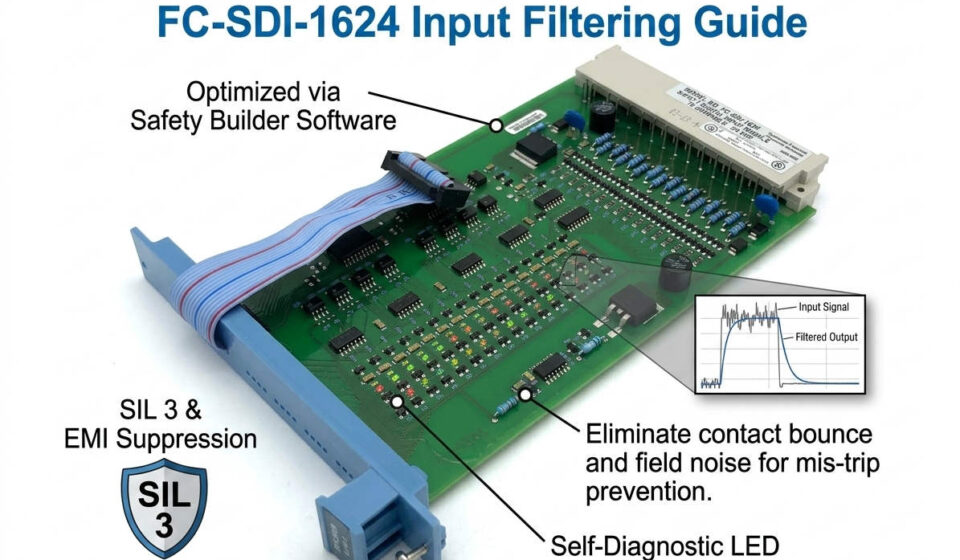
Filter time settings define the duration a signal must remain stable before state recognition. The safety controller ignores pulses shorter than the defined threshold. For instance, fast-response applications like turbine trips require 5–10 ms settings. Standard dry contacts typically utilize 20–50 ms to account for mechanical bounce. However, high-interference environments might require 100 ms to suppress electrical noise. Experts at Powergear X Automation Limited recommend balancing response speed with signal stability to optimize performance.
Combating Electromagnetic Interference in Harsh Environments
Industrial sites often house high-power motors and variable frequency drives (VFDs). These components generate significant electromagnetic interference (EMI). The FC-SDI-1624 effectively filters these transients when configured correctly within Safety Builder. Moreover, long cable runs in petrochemical plants can introduce inductive coupling. Increasing the software filter from 10 ms to 50 ms often resolves intermittent "ghost" signals. This software-based solution eliminates the need for expensive hardware modifications or additional shielding in many cases.
System Diagnostics and Maintenance Transparency
Advanced control systems rely on Sequence of Events (SOE) data for root cause analysis. While heavy filtering improves stability, it can mask underlying wiring faults. For example, a loose terminal might generate micro-interruptions that the filter suppresses. During commissioning, technicians should monitor diagnostics for 24 hours at moderate settings. This practice ensures that diagnostic transparency remains high. Furthermore, consistent filter settings across redundant channels prevent synchronization errors in the safety logic.
Step-by-Step Configuration in Safety Builder
Configuring the filter parameters involves a specific workflow within the Honeywell engineering environment. Follow these steps for precise implementation:
- Open your active project within the Safety Builder software interface.
- Access the I/O Configuration tree and locate the specific FC-SDI-1624 module.
- Select the target input channel required for the safety loop.
- Adjust the Input Filter Time parameter based on field conditions.
- Download the updated configuration to the safety controller during a maintenance window.
- Verify the signal response time through live simulation to ensure compliance.
Strategic Selection and Compatibility Considerations
Choosing the right input module requires understanding backward compatibility. The FC-SDI-1624 is a modern standard, but firmware alignment is critical. Before purchasing, verify your Safety Manager firmware revision and TÜV certification status. In mixed-generation systems, mismatched software versions may prevent parameter synchronization. Powergear X Automation Limited advises conducting an offline FAT (Factory Acceptance Test) simulation for all brownfield upgrades to verify timing consistency.
Industry Standards and E-E-A-T Principles
Global standards such as IEC 61508 and IEC 61511 dictate safety loop response times. The filter delay must be included in the total safety instrumented function (SIF) calculation. Industry reports from MarketsandMarkets highlight a growing demand for SIL 3 rated hardware in offshore platforms. The FC-SDI-1624 meets these stringent requirements through robust hardware design and flexible software parameters. Utilizing validated hardware from reputable brands ensures both audit readiness and personnel safety.
Author Commentary: The Powergear X Perspective
At Powergear X Automation Limited, we believe that software filtering is a powerful but sensitive tool. Engineers often "over-filter" signals to stop annoying alarms, but this can delay critical shutdowns. We recommend a "data-first" approach: use SOE records to identify actual noise frequencies before changing parameters. As industrial automation shifts toward more digitized fieldbus solutions, the reliability of discrete inputs like the FC-SDI-1624 remains a fundamental pillar of plant safety.
Application Solutions and Scenarios
- ✅ Petrochemical Refineries: Managing emergency shutdown (ESD) pushbuttons across long-distance cable trays.
- ✅ Offshore Platforms: Suppressing vibration-induced contact bounce in flame and gas detection systems.
- ✅ Pharmaceutical Units: Ensuring high-speed response for pressure limit switches in batch reactors.
- ✅ Gas Compression: Filtering noise from high-voltage motor starters in the vicinity of safety I/O.
Maintenance Best Practices Checklist
- 🔧 Use shielded twisted pair cabling for any digital input run exceeding 50 meters.
- 🔧 Ensure shield grounding is applied at only one end to prevent ground loops.
- 🔧 Inspect field relay contacts for oxidation if input signals fluctuate unexpectedly.
- 🔧 Verify that 24 VDC power supplies are isolated from "dirty" inductive loads.
Frequently Asked Questions (FAQ)
Q1: Will increasing filter time affect my SIL certification?
Yes, every millisecond of filtering adds to the total response time of the safety loop. You must ensure the new total time remains within the Process Safety Time (PST) defined in your original safety requirement specification.
Q2: Why does my SOE record show a different timestamp than the field event?
The SOE timestamp typically reflects when the filter logic successfully validated the signal. If you set a 100 ms filter, the recorded event will lag the actual physical transition by at least that duration.
Q3: Can the FC-SDI-1624 module detect a broken wire?
Standard digital inputs detect voltage levels. To detect broken wires (line monitoring), you must ensure the module is configured for "Line Monitored" mode and utilize the appropriate resistor network at the field device.